
공개 인터페이스 기록
AI Agent를 위해 구조화된, 출처가 명확한 금융 사실.
CLI + Skill과 MCP는 주요 Agent 인터페이스이며 REST는 HTTPS와 배치 전송을 제공합니다. 모든 응답에는 상태 및 거버넌스 메타데이터가 포함되며, 반환되는 사실에는 출처 증거와 시간 의미가 연결됩니다.
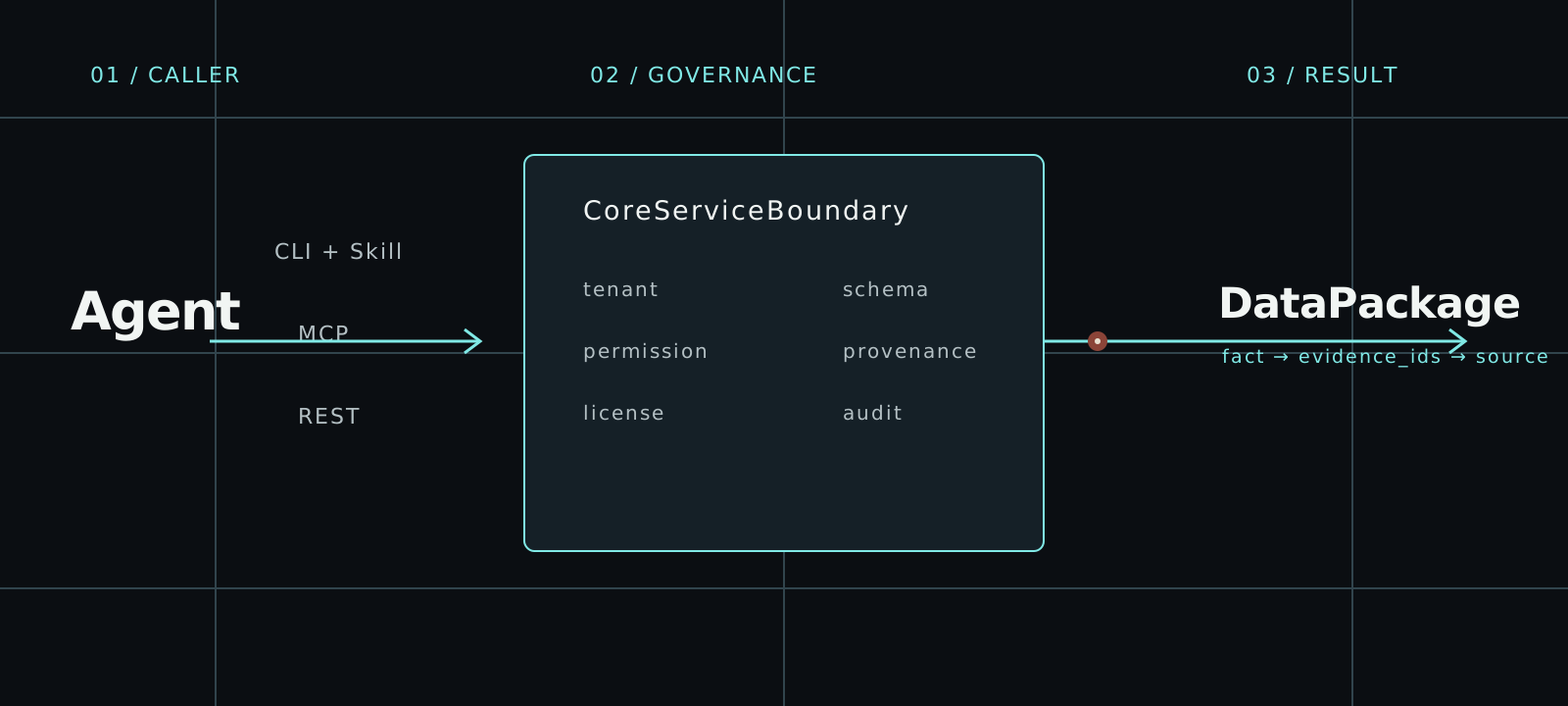
AI agent에 맞는 인터페이스 선택
세 가지 액세스 경로는 모두 동일한 CoreServiceBoundary로 진입합니다. Tenant, 권한, 라이선스, 증거, 프로비넌스 및 감사 규칙은 클라이언트에 따라 변경되지 않습니다.
01CLI
argus auth login
argus --base-url https://api.argusfa.com entity-resolve \
  --identifier-type lei \
--identifier-value HWUPKR0MPOU8FGXBT39402REST
# First run: argus auth login
import json
from urllib.request import Request, HTTPRedirectHandler, build_opener
from argus.cli.oauth import CliOAuthProfile

profile = CliOAuthProfile()
token = profile.client().access_token()
if token is None:
    raise RuntimeError("Run argus auth login first")

class NoRedirect(HTTPRedirectHandler):
    def redirect_request(self, *args, **kwargs):
        return None

request = Request(
    profile.api_base_url + "/v1/entity-resolve",
    data=json.dumps(json.loads(r'''{"identifier_type":"lei","identifier_value":"HWUPKR0MPOU8FGXBT394","purpose":"factual_lookup","requires_redistribution":false}''')).encode(),
    headers={"Authorization": f"Bearer {token}",
             "Content-Type": "application/json", "User-Agent": "Argus REST client"},
    method="POST",
)
with build_opener(NoRedirect()).open(request, timeout=30) as response:
    envelope = json.load(response)
print(json.dumps(envelope, indent=2))03MCP
# 한 번만 설치: use the official Argus installer.
# argus auth login --interface mcp
import asyncio
import json
from datetime import timedelta

from argus.cli.oauth import CliOAuthProfile
from mcp import ClientSession
from mcp.client.streamable_http import streamable_http_client
from mcp.shared._httpx_utils import create_mcp_http_client


def decode_tool_result(response):
    if response.isError:
        raise RuntimeError(response.content)
    if response.structuredContent is not None:
        return response.structuredContent
    text = next(block.text for block in response.content if block.type == "text")
    return json.loads(text)


async def main() -> None:
    tool_name = "entity_resolve"
    arguments = json.loads(r'''{"identifier_type":"lei","identifier_value":"HWUPKR0MPOU8FGXBT394","purpose":"factual_lookup","requires_redistribution":false}''')
    profile = CliOAuthProfile.from_environment().for_interface("mcp")
    token = profile.client().access_token()
    if token is None:
        raise RuntimeError("Run argus auth login --interface mcp first")

    async with (
        create_mcp_http_client(headers={"Authorization": f"Bearer {token}"}) as http,
        streamable_http_client(profile.audience, http_client=http) as (read, write, _),
    ):
        async with ClientSession(
            read,
            write,
            read_timeout_seconds=timedelta(seconds=30),
        ) as session:
            await session.initialize()
            listed_tools = {tool.name for tool in (await session.list_tools()).tools}
            registry = decode_tool_result(
                await session.call_tool("agent_tool_registry")
            )
            registry_tools = {tool["tool_name"] for tool in registry["tools"]}
            if tool_name not in listed_tools or tool_name not in registry_tools:
                raise RuntimeError(f"현재 도구 레지스트리에서 이 도구를 사용할 수 없습니다: {tool_name}")

            response = await session.call_tool(
                tool_name,
                arguments=arguments,
            )
            payload = decode_tool_result(response)
            if payload.get("success") is not True:
                error = payload.get("error")
                audit_id = payload.get("audit_id")
                if audit_id is None and isinstance(error, dict):
                    audit_id = error.get("audit_id")
                raise RuntimeError(f"Argus 요청 실패 (audit_id={audit_id}): {error}")
            print(json.dumps(payload, indent=2, ensure_ascii=False))


asyncio.run(main())처음부터 끝까지 하나의 관리 경로
실행 전에 탐색합니다. 성공과 거부 모두 구조화되고 경계가 명확하며 감사할 수 있습니다.
- 01
identityOAuth subject · scopes · purpose · as_of - 02
registryagent_tool_registry · scopes · allowed_purposes - 03
boundarytenant · permission · license · provenance · audit - 04
DataPackagefacts · source_evidence · known_time · quality · audit_id
재사용 가능한 요청 예시
도구를 호출하기 전에 OAuth로 로그인하세요. 이 요청은 실제 GLEIF 법인을 사용합니다. 결과를 사용하기 전에 반환된 적용 범위와 증거를 확인하세요. 무인 실행에 사용하는 머신 자격 증명은 비밀 정보 전용 환경에 보관하세요.
- 대화형 OAuth로 AI agent를 연결하고 무인 자동화에는 machine client 또는 service account를 사용합니다.
- 먼저 도구 레지스트리를 읽고 범위와 목적이 ID에 맞는 도구를 선택합니다.
- CLI + Skill과 MCP를 주요 Agent 인터페이스로 사용하고 REST는 HTTPS 및 배치 전송에 사용하세요.
- 명시적인 as_of 시각으로 호출합니다.
- 사용 전에 증거, 품질, 라이선스, 제한 및 audit_id를 검증합니다.
상태 코드만이 아니라 패키지를 검증
전송 성공만으로 사실을 사용할 수 있는 것은 아닙니다. 자동화 전에 관리 응답 봉투와 내부 DataPackage를 검사합니다.
요청 구문만 보여 주는 예시입니다. 실제 식별자와 이전 호출에서 반환된 증거, 적용 범위가 확인된 시간 범위를 사용하세요. 이 예시는 프로덕션 비즈니스 결과가 완료되었음을 보여 주지 않습니다.
{
  "success": true,
  "tool_name": "company_fact_snapshot",
  "output_format": "json",
  "audit_id": "audit_01JYEXAMPLE0000000000000000",
  "data_package_version": "company-fact-snapshot-cli-v1",
  "source_evidence": [
    {
      "evidence_id": "evidence:filing:1",
      "source_type": "regulatory_filing",
      "source_file_id": "filing:example-inc:2025-10k",
      "document_url": "https://regulator.example.test/filings/example-inc-2025-10k",
      "fragment_position": "char:1024-1080",
      "page_number": 42,
      "paragraph_position": null,
      "field_path": "filing.financials.revenue",
      "filing_time": "2026-06-15T09:00:00Z",
      "retrieved_at": "2026-06-16T09:30:00Z",
      "parser_version": "filing-parser-v1",
      "evidence_confidence": 0.99,
      "credibility_level": "regulatory_original",
      "pointer_type": "source_fragment",
      "content_trust": "untrusted_source_text",
      "mime_type": "text/plain",
      "source_object_sha256": null,
      "excerpt_boundary": "external_source_data",
      "is_conflicting": false,
      "conflict_group_id": null
    }
  ],
  "permission_result": {
    "allowed": true,
    "checked_at": "2026-06-16T10:00:00Z",
    "missing_permissions": [],
    "reason": "permission_allowed",
    "safe_alternative_tools": [
      "company_fact_snapshot",
      "filing_search",
      "source_evidence_lookup"
    ]
  },
  "license_status": "authorized",
  "output_restrictions": [
    "machine_readable_json",
    "cite_source_evidence"
  ],
  "result": {
    "package_type": "company_fact_snapshot",
    "package_version": "company-fact-snapshot-cli-v1",
    "generated_at": "2026-06-16T10:00:00Z",
    "request_subject": "company:example-inc",
    "caller_id": "service:customer-agent",
    "institution_id": "institution:customer",
    "request_purpose": "factual_lookup",
    "facts": [
      {
        "fact_id": "fact:revenue",
        "fact_type": "financial_metric",
        "field_name": "revenue",
        "value": 125000000,
        "evidence_ids": [
          "evidence:filing:1"
        ],
        "credibility_level": "regulatory_original",
        "extraction_method": "structured_source",
        "confidence": 0.99,
        "review_status": null
      }
    ],
    "sections": [],
    "source_evidence": [
      {
        "evidence_id": "evidence:filing:1",
        "source_type": "regulatory_filing",
        "source_file_id": "filing:example-inc:2025-10k",
        "document_url": "https://regulator.example.test/filings/example-inc-2025-10k",
        "fragment_position": "char:1024-1080",
        "page_number": 42,
        "paragraph_position": null,
        "field_path": "filing.financials.revenue",
        "filing_time": "2026-06-15T09:00:00Z",
        "retrieved_at": "2026-06-16T09:30:00Z",
        "parser_version": "filing-parser-v1",
        "evidence_confidence": 0.99,
        "credibility_level": "regulatory_original",
        "pointer_type": "source_fragment",
        "content_trust": "untrusted_source_text",
        "mime_type": "text/plain",
        "source_object_sha256": null,
        "excerpt_boundary": "external_source_data",
        "is_conflicting": false,
        "conflict_group_id": null
      }
    ],
    "data_period": {
      "start": "2025-01-01T00:00:00Z",
      "end": "2025-12-31T23:59:59Z"
    },
    "filing_time": "2026-06-15T09:00:00Z",
    "known_time": "2026-06-16T09:30:00Z",
    "revision_time": null,
    "invocation_time": "2026-06-16T10:00:00Z",
    "data_quality": {
      "quality_level": "high",
      "issues": [],
      "requires_human_review": false
    },
    "credibility_level": "regulatory_original",
    "data_license": {
      "license_id": "public-disclosure-v1",
      "source": "regulatory_filing",
      "status": "authorized",
      "allowed_uses": [
        "factual_lookup",
        "audit_reproduction"
      ],
      "prohibited_uses": [
        "restricted_redistribution"
      ],
      "redistribution": "restricted",
      "authorized_institutions": [
        "institution:customer"
      ],
      "restricted_fields": []
    },
    "allowed_uses": [
      "factual_lookup",
      "audit_reproduction"
    ],
    "prohibited_uses": [
      "restricted_redistribution"
    ],
    "output_restrictions": [
      "machine_readable_json",
      "cite_source_evidence"
    ],
    "structured_output_flags": {},
    "audit_id": "audit_01JYEXAMPLE0000000000000000",
    "output_policy_version": "[email protected]"
  }
}도구
공개 도구 레지스트리는 현재 53개의 관리 도구를 정의합니다. 아래 기록은 도구 디렉터리와 동일한 권위 데이터에서 생성됩니다.
- 01
- REST
/v1/company-fact-snapshot- MCP
company_fact_snapshot- 반환 계약
- CliToolEnvelope JSON with nested DataPackage result
- 02
- REST
/v1/point-in-time-snapshot- MCP
point_in_time_snapshot- 반환 계약
- CliToolEnvelope JSON with nested DataPackage result
- 03
- REST
/v1/evidence-gap-report- MCP
evidence_gap_report- 반환 계약
- CliToolEnvelope JSON with nested DataPackage result
- 04
- REST
/v1/agent-data-preflight- MCP
agent_data_preflight- 반환 계약
- CliToolEnvelope JSON with nested agent_data_preflight_result DataPackage
신뢰
Argus는 한계가 보이는 사실 인프라입니다. 거부, 제한, 최신성, 라이선스 상태 및 사람 검토 요구 사항이 결과에 유지됩니다.
[POLICY]Argus 자체는 투자 판단이나 주문을 생성하지 않지만, 클라이언트 Agent가 합법적으로 얻은 데이터로 독립적으로 추론하고 출력하는 것을 제한하지 않습니다.
권위 있는 연결 안내서로 계속
첫 요청 가이드에서 시작하거나 모든 도구를 확인하고 AI agent가 사용하는 인터페이스 문서로 이동합니다.