
सार्वजनिक इंटरफ़ेस अभिलेख
AI Agent के लिए संरचित, उद्धृत वित्तीय तथ्य।
CLI + Skill और MCP मुख्य Agent इंटरफ़ेस हैं; REST HTTPS और बैच ट्रांसपोर्ट प्रदान करता है। हर प्रतिक्रिया में स्थिति और शासन मेटाडेटा शामिल होता है; लौटाए गए तथ्यों को स्रोत साक्ष्य और समय अर्थ से जोड़ा जाता है।
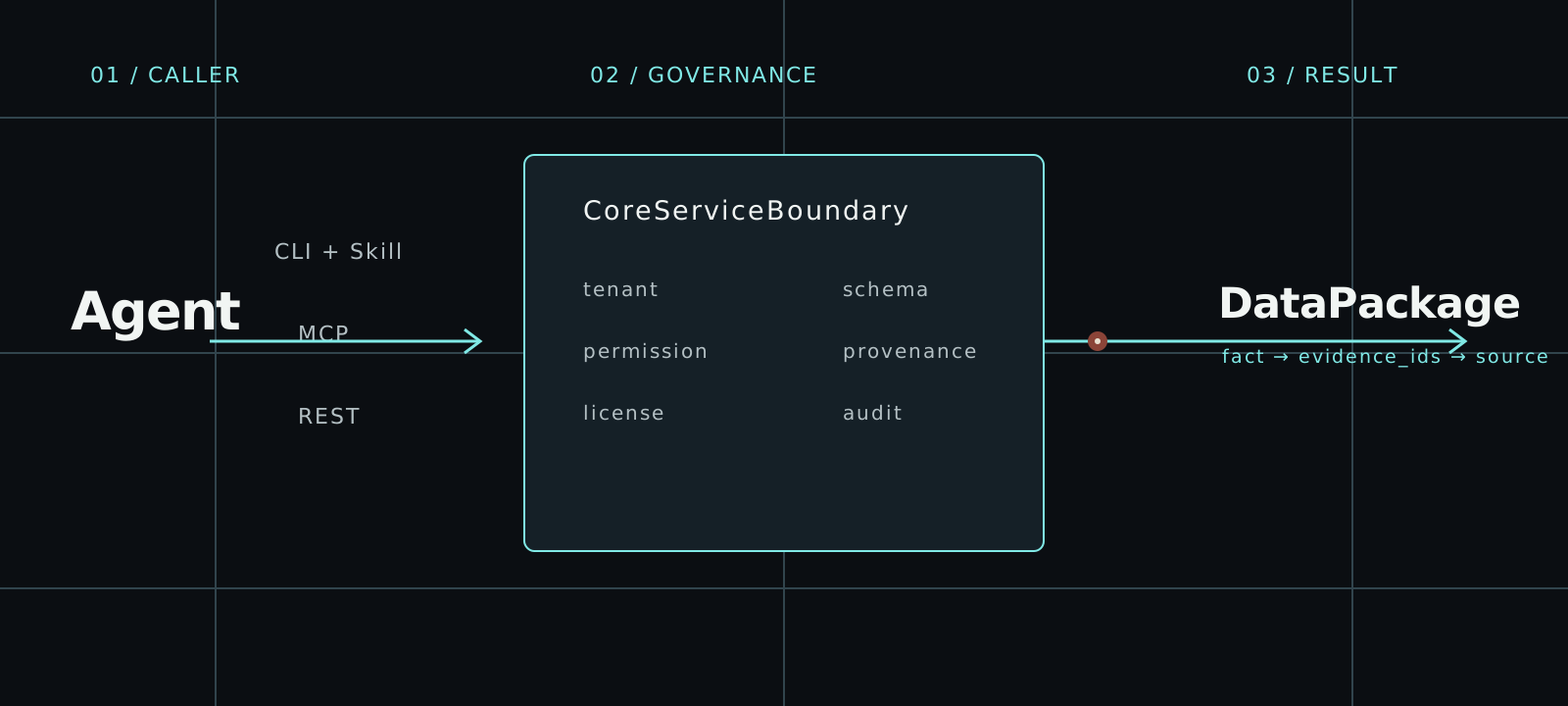
अपने AI agent के लिए सही इंटरफ़ेस चुनें
तीनों एक्सेस पाथ एक ही CoreServiceBoundary में प्रवेश करते हैं। Tenant, अनुमति, लाइसेंस, साक्ष्य, प्रोवेनेंस और ऑडिट नियम क्लाइंट के अनुसार नहीं बदलते।
01CLI
argus auth login
argus --base-url https://api.argusfa.com entity-resolve \
  --identifier-type lei \
--identifier-value HWUPKR0MPOU8FGXBT39402REST
# First run: argus auth login
import json
from urllib.request import Request, HTTPRedirectHandler, build_opener
from argus.cli.oauth import CliOAuthProfile

profile = CliOAuthProfile()
token = profile.client().access_token()
if token is None:
    raise RuntimeError("Run argus auth login first")

class NoRedirect(HTTPRedirectHandler):
    def redirect_request(self, *args, **kwargs):
        return None

request = Request(
    profile.api_base_url + "/v1/entity-resolve",
    data=json.dumps(json.loads(r'''{"identifier_type":"lei","identifier_value":"HWUPKR0MPOU8FGXBT394","purpose":"factual_lookup","requires_redistribution":false}''')).encode(),
    headers={"Authorization": f"Bearer {token}",
             "Content-Type": "application/json", "User-Agent": "Argus REST client"},
    method="POST",
)
with build_opener(NoRedirect()).open(request, timeout=30) as response:
    envelope = json.load(response)
print(json.dumps(envelope, indent=2))03MCP
# केवल एक बार इंस्टॉल करें: use the official Argus installer.
# argus auth login --interface mcp
import asyncio
import json
from datetime import timedelta

from argus.cli.oauth import CliOAuthProfile
from mcp import ClientSession
from mcp.client.streamable_http import streamable_http_client
from mcp.shared._httpx_utils import create_mcp_http_client


def decode_tool_result(response):
    if response.isError:
        raise RuntimeError(response.content)
    if response.structuredContent is not None:
        return response.structuredContent
    text = next(block.text for block in response.content if block.type == "text")
    return json.loads(text)


async def main() -> None:
    tool_name = "entity_resolve"
    arguments = json.loads(r'''{"identifier_type":"lei","identifier_value":"HWUPKR0MPOU8FGXBT394","purpose":"factual_lookup","requires_redistribution":false}''')
    profile = CliOAuthProfile.from_environment().for_interface("mcp")
    token = profile.client().access_token()
    if token is None:
        raise RuntimeError("Run argus auth login --interface mcp first")

    async with (
        create_mcp_http_client(headers={"Authorization": f"Bearer {token}"}) as http,
        streamable_http_client(profile.audience, http_client=http) as (read, write, _),
    ):
        async with ClientSession(
            read,
            write,
            read_timeout_seconds=timedelta(seconds=30),
        ) as session:
            await session.initialize()
            listed_tools = {tool.name for tool in (await session.list_tools()).tools}
            registry = decode_tool_result(
                await session.call_tool("agent_tool_registry")
            )
            registry_tools = {tool["tool_name"] for tool in registry["tools"]}
            if tool_name not in listed_tools or tool_name not in registry_tools:
                raise RuntimeError(f"यह टूल वर्तमान टूल रजिस्ट्री में उपलब्ध नहीं है: {tool_name}")

            response = await session.call_tool(
                tool_name,
                arguments=arguments,
            )
            payload = decode_tool_result(response)
            if payload.get("success") is not True:
                error = payload.get("error")
                audit_id = payload.get("audit_id")
                if audit_id is None and isinstance(error, dict):
                    audit_id = error.get("audit_id")
                raise RuntimeError(f"Argus अनुरोध विफल रहा (audit_id={audit_id}): {error}")
            print(json.dumps(payload, indent=2, ensure_ascii=False))


asyncio.run(main())आरंभ से अंत तक एक शासित मार्ग
निष्पादन से पहले खोज होती है। सफल या अस्वीकृत, हर कॉल संरचित, सीमित और ऑडिट योग्य रहती है।
- 01
identityOAuth subject · scopes · purpose · as_of - 02
registryagent_tool_registry · scopes · allowed_purposes - 03
boundarytenant · permission · license · provenance · audit - 04
DataPackagefacts · source_evidence · known_time · quality · audit_id
दोबारा उपयोग योग्य अनुरोध संदर्भ
किसी टूल को कॉल करने से पहले OAuth से साइन इन करें। इन अनुरोधों में एक वास्तविक GLEIF कानूनी इकाई का उपयोग होता है; परिणाम का उपयोग करने से पहले लौटाई गई कवरेज और साक्ष्य की जाँच करें। बिना निगरानी चलने वाली मशीन के क्रेडेंशियल अपने गोपनीयता-सुरक्षित परिवेश में रखें।
- AI agent को interactive OAuth से जोड़ें; बिना निगरानी वाले स्वचालन के लिए machine client या service account उपयोग करें।
- पहले टूल रजिस्ट्री पढ़ें और ऐसा टूल चुनें जिसके स्कोप और उद्देश्य पहचान से मेल खाते हों।
- CLI + Skill और MCP को मुख्य Agent इंटरफ़ेस के रूप में उपयोग करें; HTTPS और बैच ट्रांसपोर्ट के लिए REST का उपयोग करें।
- स्पष्ट as_of समय के साथ कॉल करें।
- तथ्यों के उपयोग से पहले साक्ष्य, गुणवत्ता, लाइसेंस, प्रतिबंध और audit_id जाँचें।
केवल स्थिति कोड नहीं, पैकेज सत्यापित करें
ट्रांसपोर्ट सफलता तथ्य के उपयोग योग्य होने का प्रमाण नहीं है। स्वचालन से पहले शासित आवरण और उसके DataPackage की जाँच करें।
यहाँ केवल अनुरोध का सिंटैक्स दिखाया गया है। वास्तविक पहचानकर्ताओं, पहले की कॉल से मिले साक्ष्य और पुष्ट कवरेज वाली समयावधि का उपयोग करें। यह उदाहरण किसी पूर्ण हो चुके उत्पादन व्यावसायिक परिणाम को प्रदर्शित नहीं करता।
{
  "success": true,
  "tool_name": "company_fact_snapshot",
  "output_format": "json",
  "audit_id": "audit_01JYEXAMPLE0000000000000000",
  "data_package_version": "company-fact-snapshot-cli-v1",
  "source_evidence": [
    {
      "evidence_id": "evidence:filing:1",
      "source_type": "regulatory_filing",
      "source_file_id": "filing:example-inc:2025-10k",
      "document_url": "https://regulator.example.test/filings/example-inc-2025-10k",
      "fragment_position": "char:1024-1080",
      "page_number": 42,
      "paragraph_position": null,
      "field_path": "filing.financials.revenue",
      "filing_time": "2026-06-15T09:00:00Z",
      "retrieved_at": "2026-06-16T09:30:00Z",
      "parser_version": "filing-parser-v1",
      "evidence_confidence": 0.99,
      "credibility_level": "regulatory_original",
      "pointer_type": "source_fragment",
      "content_trust": "untrusted_source_text",
      "mime_type": "text/plain",
      "source_object_sha256": null,
      "excerpt_boundary": "external_source_data",
      "is_conflicting": false,
      "conflict_group_id": null
    }
  ],
  "permission_result": {
    "allowed": true,
    "checked_at": "2026-06-16T10:00:00Z",
    "missing_permissions": [],
    "reason": "permission_allowed",
    "safe_alternative_tools": [
      "company_fact_snapshot",
      "filing_search",
      "source_evidence_lookup"
    ]
  },
  "license_status": "authorized",
  "output_restrictions": [
    "machine_readable_json",
    "cite_source_evidence"
  ],
  "result": {
    "package_type": "company_fact_snapshot",
    "package_version": "company-fact-snapshot-cli-v1",
    "generated_at": "2026-06-16T10:00:00Z",
    "request_subject": "company:example-inc",
    "caller_id": "service:customer-agent",
    "institution_id": "institution:customer",
    "request_purpose": "factual_lookup",
    "facts": [
      {
        "fact_id": "fact:revenue",
        "fact_type": "financial_metric",
        "field_name": "revenue",
        "value": 125000000,
        "evidence_ids": [
          "evidence:filing:1"
        ],
        "credibility_level": "regulatory_original",
        "extraction_method": "structured_source",
        "confidence": 0.99,
        "review_status": null
      }
    ],
    "sections": [],
    "source_evidence": [
      {
        "evidence_id": "evidence:filing:1",
        "source_type": "regulatory_filing",
        "source_file_id": "filing:example-inc:2025-10k",
        "document_url": "https://regulator.example.test/filings/example-inc-2025-10k",
        "fragment_position": "char:1024-1080",
        "page_number": 42,
        "paragraph_position": null,
        "field_path": "filing.financials.revenue",
        "filing_time": "2026-06-15T09:00:00Z",
        "retrieved_at": "2026-06-16T09:30:00Z",
        "parser_version": "filing-parser-v1",
        "evidence_confidence": 0.99,
        "credibility_level": "regulatory_original",
        "pointer_type": "source_fragment",
        "content_trust": "untrusted_source_text",
        "mime_type": "text/plain",
        "source_object_sha256": null,
        "excerpt_boundary": "external_source_data",
        "is_conflicting": false,
        "conflict_group_id": null
      }
    ],
    "data_period": {
      "start": "2025-01-01T00:00:00Z",
      "end": "2025-12-31T23:59:59Z"
    },
    "filing_time": "2026-06-15T09:00:00Z",
    "known_time": "2026-06-16T09:30:00Z",
    "revision_time": null,
    "invocation_time": "2026-06-16T10:00:00Z",
    "data_quality": {
      "quality_level": "high",
      "issues": [],
      "requires_human_review": false
    },
    "credibility_level": "regulatory_original",
    "data_license": {
      "license_id": "public-disclosure-v1",
      "source": "regulatory_filing",
      "status": "authorized",
      "allowed_uses": [
        "factual_lookup",
        "audit_reproduction"
      ],
      "prohibited_uses": [
        "restricted_redistribution"
      ],
      "redistribution": "restricted",
      "authorized_institutions": [
        "institution:customer"
      ],
      "restricted_fields": []
    },
    "allowed_uses": [
      "factual_lookup",
      "audit_reproduction"
    ],
    "prohibited_uses": [
      "restricted_redistribution"
    ],
    "output_restrictions": [
      "machine_readable_json",
      "cite_source_evidence"
    ],
    "structured_output_flags": {},
    "audit_id": "audit_01JYEXAMPLE0000000000000000",
    "output_policy_version": "[email protected]"
  }
}उपकरण
सार्वजनिक टूल रजिस्ट्री अभी 53 शासित टूल परिभाषित करती है। ये प्रतिनिधि रिकॉर्ड टूल निर्देशिका वाले उसी आधिकारिक डेटा से बनते हैं।
- 01
company_fact_snapshotकंपनी फ़ैक्ट स्नैपशॉट
प्रकट कंपनी फ़ैक्ट को संरचित DataPackage के रूप में लौटाएं।
- REST
/v1/company-fact-snapshot- MCP
company_fact_snapshot- वापसी अनुबंध
- CliToolEnvelope JSON with nested DataPackage result
- 02
- REST
/v1/point-in-time-snapshot- MCP
point_in_time_snapshot- वापसी अनुबंध
- CliToolEnvelope JSON with nested DataPackage result
- 03
evidence_gap_reportसाक्ष्य अंतराल रिपोर्ट
साक्ष्य-युक्त, लापता, निम्न-गुणवत्ता, परस्पर विरोधी और लाइसेंस-अवरुद्ध वर्गीकरण लौटाएं।
- REST
/v1/evidence-gap-report- MCP
evidence_gap_report- वापसी अनुबंध
- CliToolEnvelope JSON with nested DataPackage result
- 04
agent_data_preflightएजेंट डेटा प्रीफ्लाइट
अनुमति, लाइसेंस, फ़ील्ड, समय सीमा और टारगेट-टूल प्रीफ्लाइट मेटाडेटा लौटाएं।
- REST
/v1/agent-data-preflight- MCP
agent_data_preflight- वापसी अनुबंध
- CliToolEnvelope JSON with nested agent_data_preflight_result DataPackage
विश्वास
Argus स्पष्ट सीमाओं वाली तथ्य अवसंरचना देता है। अस्वीकृति, प्रतिबंध, नवीनता, लाइसेंस स्थिति और मानव समीक्षा की आवश्यकता परिणाम में रहती है।
[POLICY]Argus स्वयं निवेश निर्णय या ऑर्डर नहीं बनाता, लेकिन क्लाइंट AI Agent को कानूनी रूप से प्राप्त डेटा से स्वतंत्र तर्क और आउटपुट करने से नहीं रोकता।
आधिकारिक एकीकरण मार्गदर्शिका पर जाएँ
पहली रिक्वेस्ट गाइड से शुरू करें, सभी टूल देखें या अपने AI agent की इंटरफ़ेस दस्तावेज़ खोलें।